
300 FS + AU$11,000 Bonus + 20% Daily Cashback
Welcome Package
Neospin Casino Login and Registration Guide
Getting into your account takes under two minutes. Our sign-up process runs across just two quick steps, your account currency is set to AUD from the start, and you can log in with either an email/password combination or your existing Google account. Whether you are brand new or returning to claim a bonus, this guide covers everything — from the Neospin casino login process to password recovery, common errors, and account security.
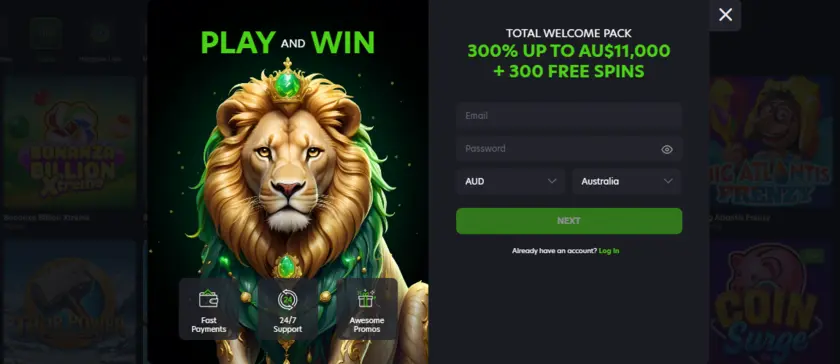
Create Your Neospin Account in Two Easy Steps
Registration here is genuinely fast — there are no lengthy forms, no waiting periods, and no guesswork. We split the process into two clean stages so you are inside the lobby before you know it.
Step 1 requires your email address, a password of your choice, your currency (AUD for Australia), and your country selection. That is it for the first screen.
Step 2 asks for your personal details:
- First name and last name
- Australian mobile number (with +61 prefix)
- Gender selection
- Promotional opt-in preference
- Confirmation that you are 18 or older
Once both steps are complete, your account is live. The entire Neospin casino Australia login journey — from blank form to active account — takes less than 90 seconds for most players. After your account is created, head straight to the cashier and apply promo code at cashier to activate your welcome package of 300% up to AU$11,000 + 300 Free Spins across your first four deposits. Codes NEO1 through NEO4 each correspond to a separate deposit, so do not rush — use them in order.
Signing In to Neospin Across All Platforms
Once your account exists, the Neospin login page offers two methods every time you return. You can enter your registered email and password, or hit the Google Sign-In button to authenticate without typing a password at all.
Most of our Australian players log in directly from a mobile browser. We offer a PWA (Progressive Web App) that installs like a native app on any device, and the Neospin casino app login experience is identical to the desktop — full game library, bonus management, and cashier in one place. Here is how to install it by platform:
- iOS (Safari): Tap the Share button, then select “Add to Home Screen”
- Android (Chrome): Open the three-dot menu, tap “Install app,” then confirm
- Mac (Chrome): Click the install icon in the address bar, then tap “Install”
- Windows (Chrome): Three-dot menu → “Install NEOSPIN Casino” → “Install”
For the Neospin pokies login specifically, the mobile PWA is the sharpest way to access the pokies lobby — games like Buffalo Trail, Sunny Coin 10000, and Snoop Dogg Dollars load instantly with no lag. If the main domain is ever inaccessible in your region, you can access via mirror link to reach the same login page without any interruption. Players searching for the Neospin 66 login will find the mirror delivers the exact same account environment as the primary site.
Account Recovery, Lost Password and Unverified Email
Locked out? It happens, and we make the recovery path straightforward. The password reset flow is triggered directly from the login screen — click “Forgot Password,” enter your registered email, and a reset link lands in your inbox within a few minutes. A handful of players searching for the Neospin 5 login find they cannot get in because their original email address is unverified or was entered incorrectly at registration. If that is your situation, contact our 24/7 support team immediately — they can manually verify your identity against your KYC documents and restore access. The documents we accept for identity checks are:
- Government-issued photo ID (passport or driver’s licence)
- Proof of address (utility bill or bank statement dated within 90 days)
- Proof of payment method used
Keep these documents ready before you reach out. Support will not leave you waiting — our team operates around the clock and can typically resolve account access issues within the same session.
Why Your Login Fails and How to Fix It
Login failures almost always come down to one of a small set of causes. Before assuming the worst, run through this checklist:
| Common Cause | Exact Fix |
|---|---|
| Incorrect email address entered | Double-check spelling; try Google Sign-In if registered via Google |
| Wrong password | Use the “Forgot Password” reset link on the login screen |
| Account not yet verified | Check inbox (and spam folder) for the verification email |
| Multiple accounts flagged | Only one account per person/IP/device is permitted |
| Browser cache conflict | Clear cookies and cache, or try a private/incognito window |
Players seeking the Neospin casino login Australia experience from regional ISPs occasionally encounter browser-level blocks. Switching networks or using a different browser resolves this in most cases. If none of the above works, our 24/7 support is reachable instantly via live chat directly from the login page.
Security Measures Protecting Your Account After Sign-In
Your account security is something we take seriously from the moment you complete the Neospin Australia login. Several protective layers activate automatically once your session begins. Our KYC process requires verified identity before any withdrawal is processed — this means your funds can only leave to accounts registered in your own name, eliminating third-party fraud. Phone verification adds a second authentication layer on top of your password. The table below summarises the key security features active on every account:
| Security Feature | Detail |
|---|---|
| KYC document verification | Photo ID + proof of address + payment method confirmation |
| Phone verification | +61 number linked to account; may be required at withdrawal |
| One account policy | Duplicates result in forfeiture; one account per household/IP/device |
| Session timeout | Automatic logout after periods of inactivity |
| Withdrawal freeze | Account locked if unreachable within 2 weeks of a pending withdrawal request |
We never store raw payment credentials on our side, and all deposits must originate from accounts held in your own name — no third-party funding is accepted. These controls exist to protect you, not to slow you down.
Frequently Asked Questions
Can I log in with Google if I originally registered with email?
Only if your Google account uses the same email address you registered with. Our system matches accounts by email — if the addresses differ, you will need to use the email and password route. If you are unsure which email you used, contact support with your registered name and phone number for a lookup.
How long does account verification take?
For most players, KYC verification completes within 24 hours of submitting documents. We review every submission manually, so having clear, unexpired documents ready speeds the process considerably. Withdrawals remain on hold until verification is fully approved — there is no workaround for this, as it protects every account holder.
What happens if I search for Neospin 7 login Australia and reach a different site?
Only our official domain and approved mirror links lead to your real account. Always verify the URL before entering your credentials. If you are unsure whether a site is genuine, close the tab and use only the login address you have used successfully before. Our support team can confirm any official mirror addresses if you are uncertain.